You are here: Home / Order guide
ZentBuy order route: seven skills between a pasted link and your porch
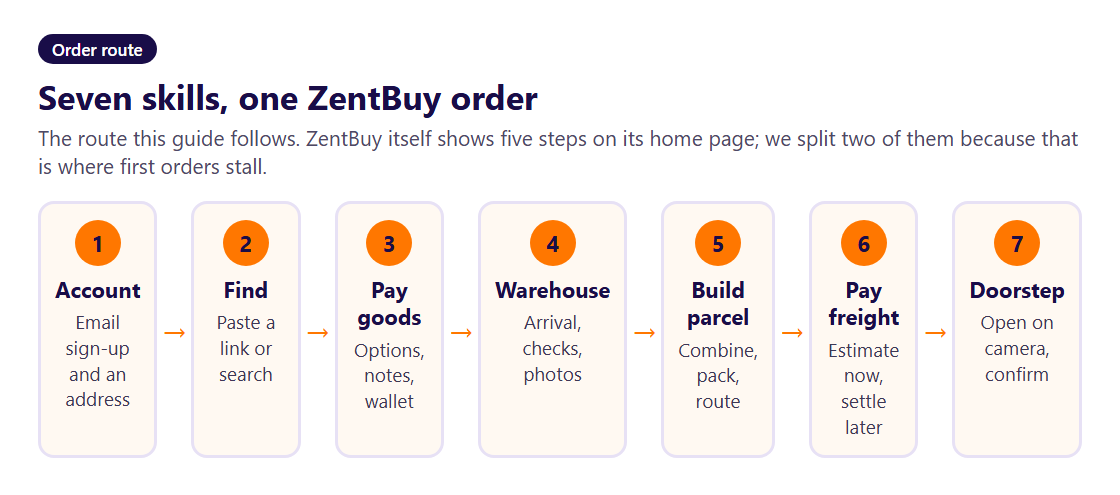
The complete ZentBuy order guide on this site. Each skill is one screen and one decision, in the order you meet them, with the ZentBuy rules that apply at that point.
Before the first move
A buying agent such as ZentBuy does three jobs you cannot easily do from abroad: it pays Chinese sellers in yuan, it receives their parcels inside China, and it repacks everything into one international shipment. ZentBuy's buyers keep Beijing daytime hours, as printed on each product page, and that page also shows an expected warehouse arrival date as soon as you open a listing.
Money leaves your wallet on two occasions. At checkout you settle the goods plus the seller's courier charge to the warehouse. Weeks later you settle international freight, once you know what is going in the parcel. Everything below follows that rhythm. If you are new to agents, keep the first basket on the paste-and-pick shelves and read this page once before you start.
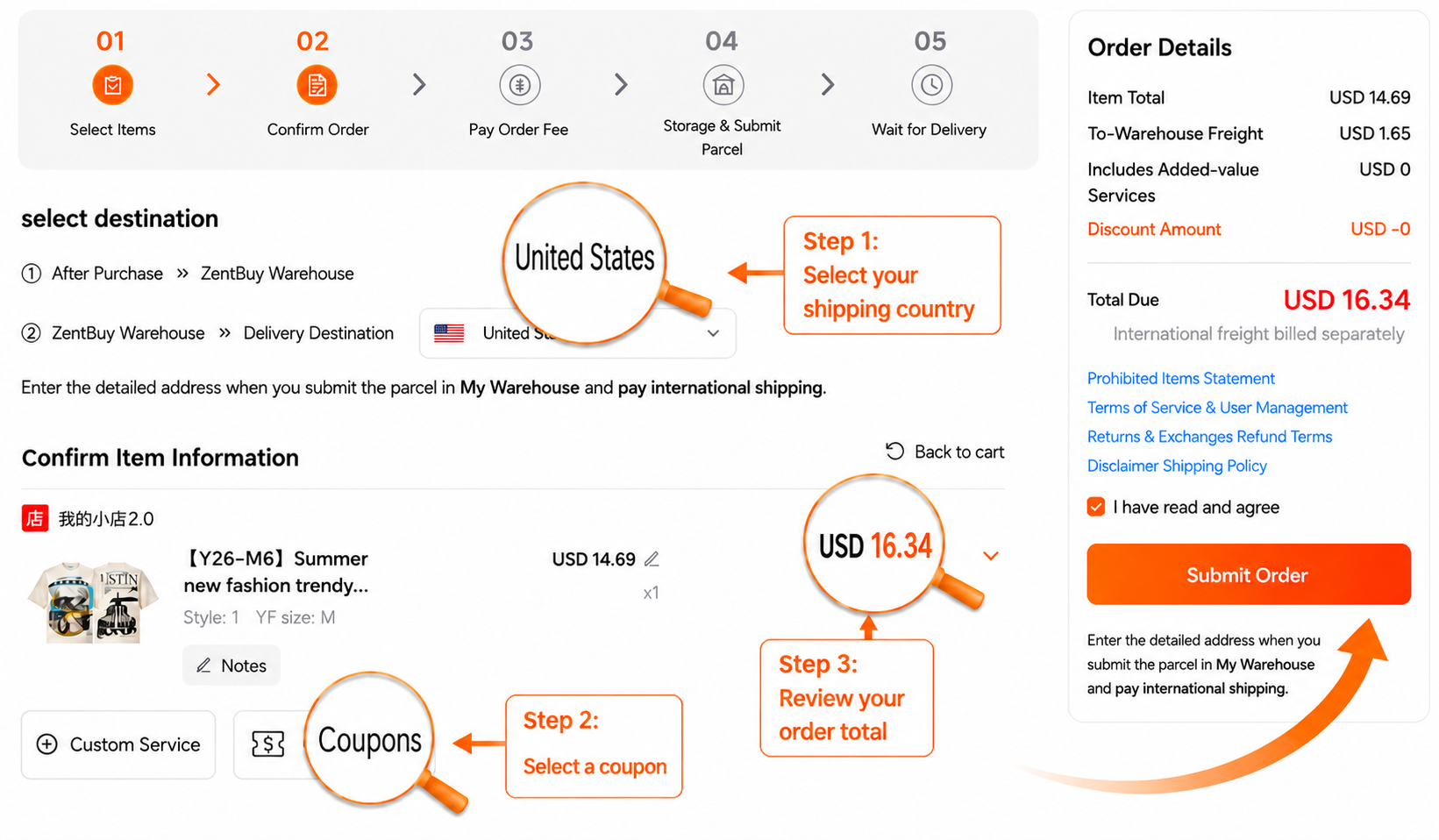
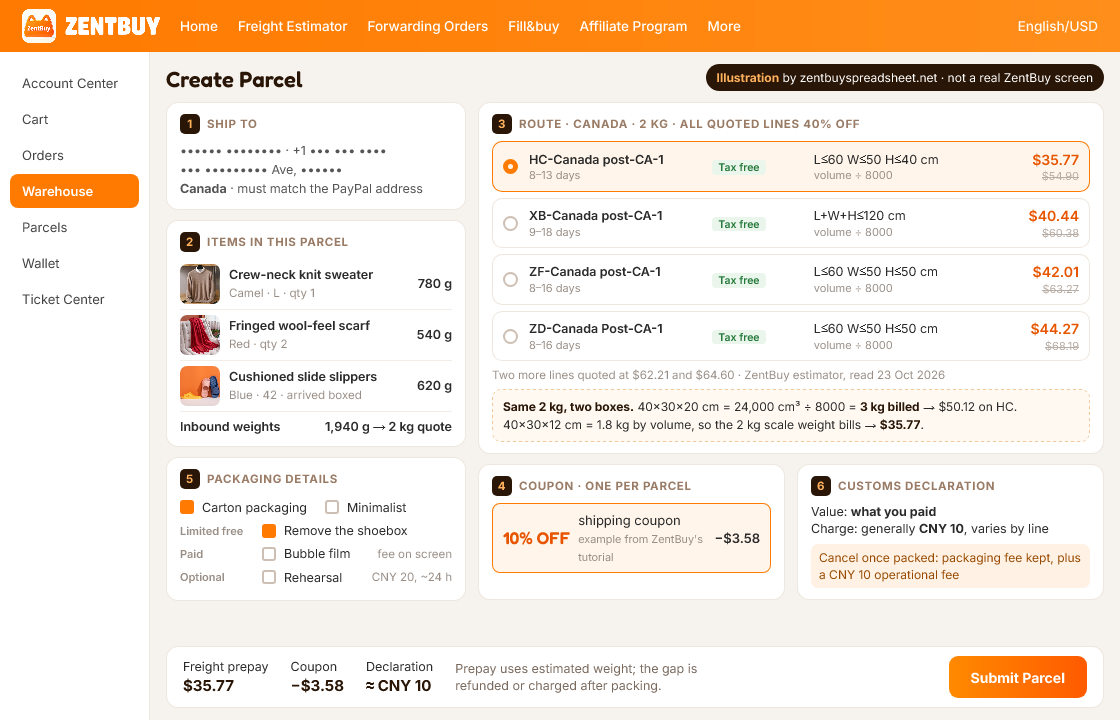
The operation screens below come from ZentBuy's official How to Use guide, rechecked 25 October 2026. They are annotated tutorial examples. Prices, payment options and routes shown must be checked again in your own checkout. The parcel-screen picture in the fifth skill is the exception: we drew it ourselves and it carries a label saying so.
First skill: an account and a delivery address
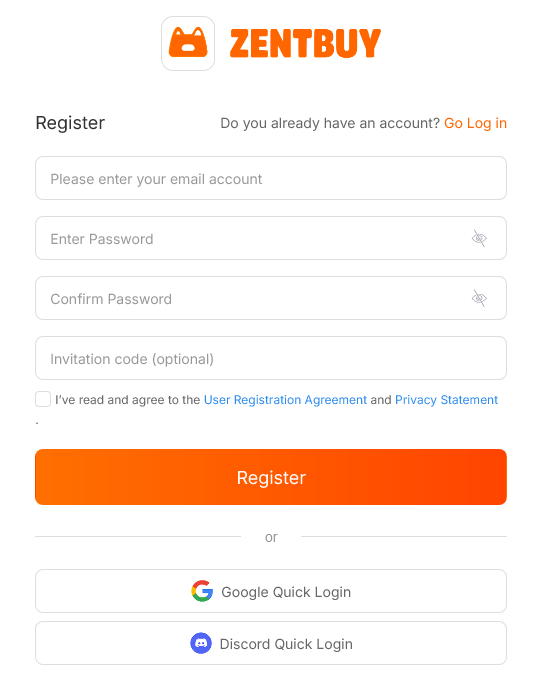
Signing up takes an email, a password entered twice and an invitation code if you have one; that box can stay empty. There is also a one-click route through a Google or Discord account. The help article on registration has one practical warning: if someone invited you, enter their code before you submit; the article describes no way to add it afterwards.
Add your delivery address early. ZentBuy uses it on the order confirmation page to check which shipping options exist for your country, and the PayPal article adds a rule that catches people out: the shipping address on a PayPal payment must match the address on your ZentBuy parcel.
Go to the ZentBuy sign-up page
Second skill: finding the listing
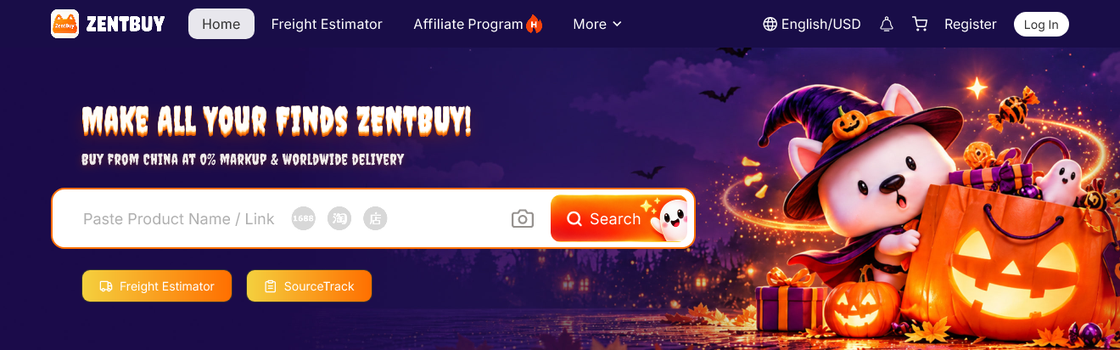
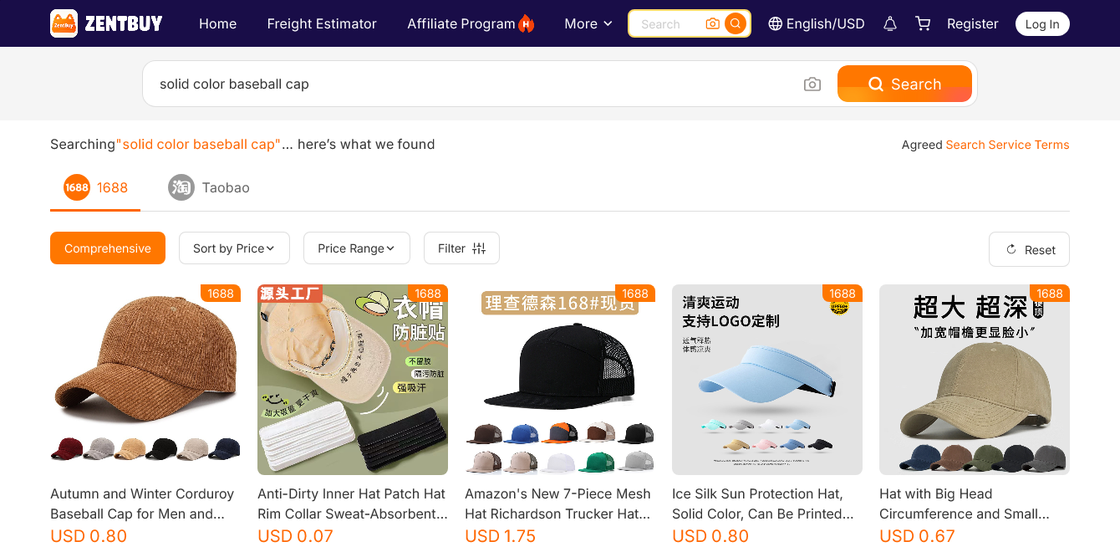
There are three ways in. Copy a listing address from Weidian, Taobao or 1688, drop it into ZentBuy's search field, and ZentBuy opens its own version of that product page. You can type plain words into that same bar, and ZentBuy shows matching listings from 1688 and Taobao on separate tabs with prices converted to dollars. Or you can browse a catalogue such as the shelves on this site, then carry the link across.
ZentBuy's help centre says plainly that sites already selling to overseas buyers (it calls them cross-border platforms) are off limits for its buyers. For listings on platforms its search cannot read, there is a manual form called Fill and Buy where you type the details yourself. Use it carefully: everything the buyer needs (price, option, link) must be right, because the buyer works from what you enter.
Third skill: options, notes and payment
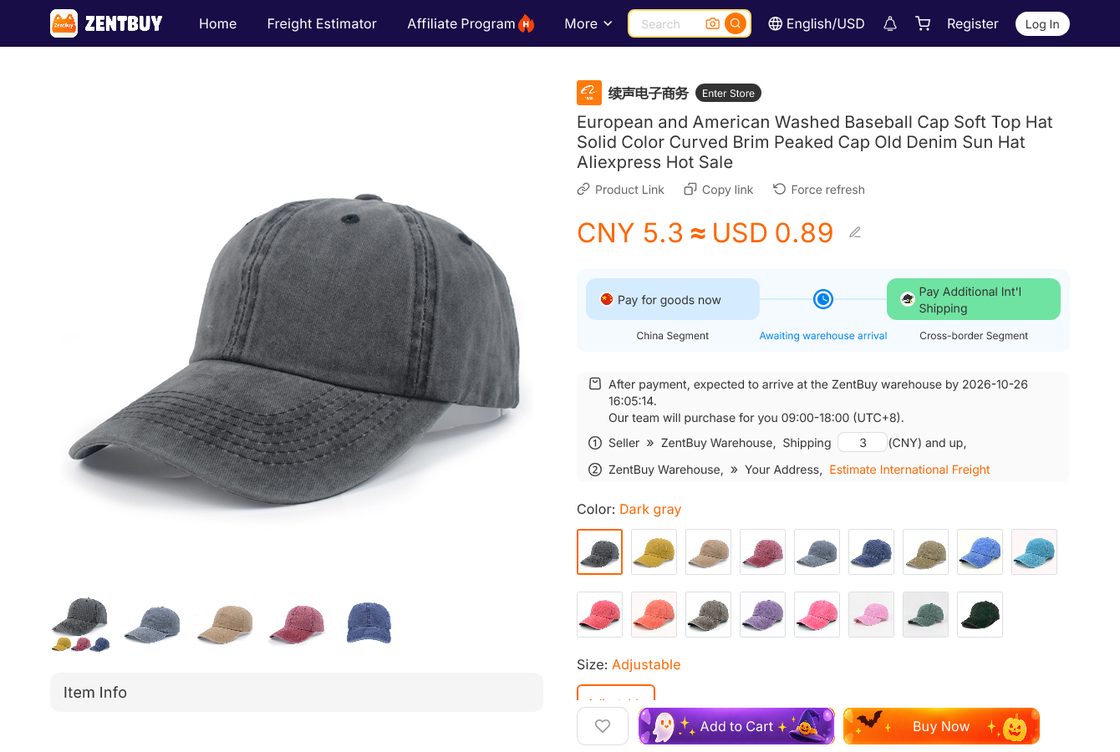
Pick colour, size and quantity on the product page, then use the message box if the buyer needs to tell the seller anything (a second colour as backup, a request to remove a shoe box). The page also shows two segments: "Pay for goods now", which is the China leg, and "Pay Additional Int'l Shipping", which comes later. Seller postage to the warehouse is printed under the price; on the cap below it was 3 CNY.
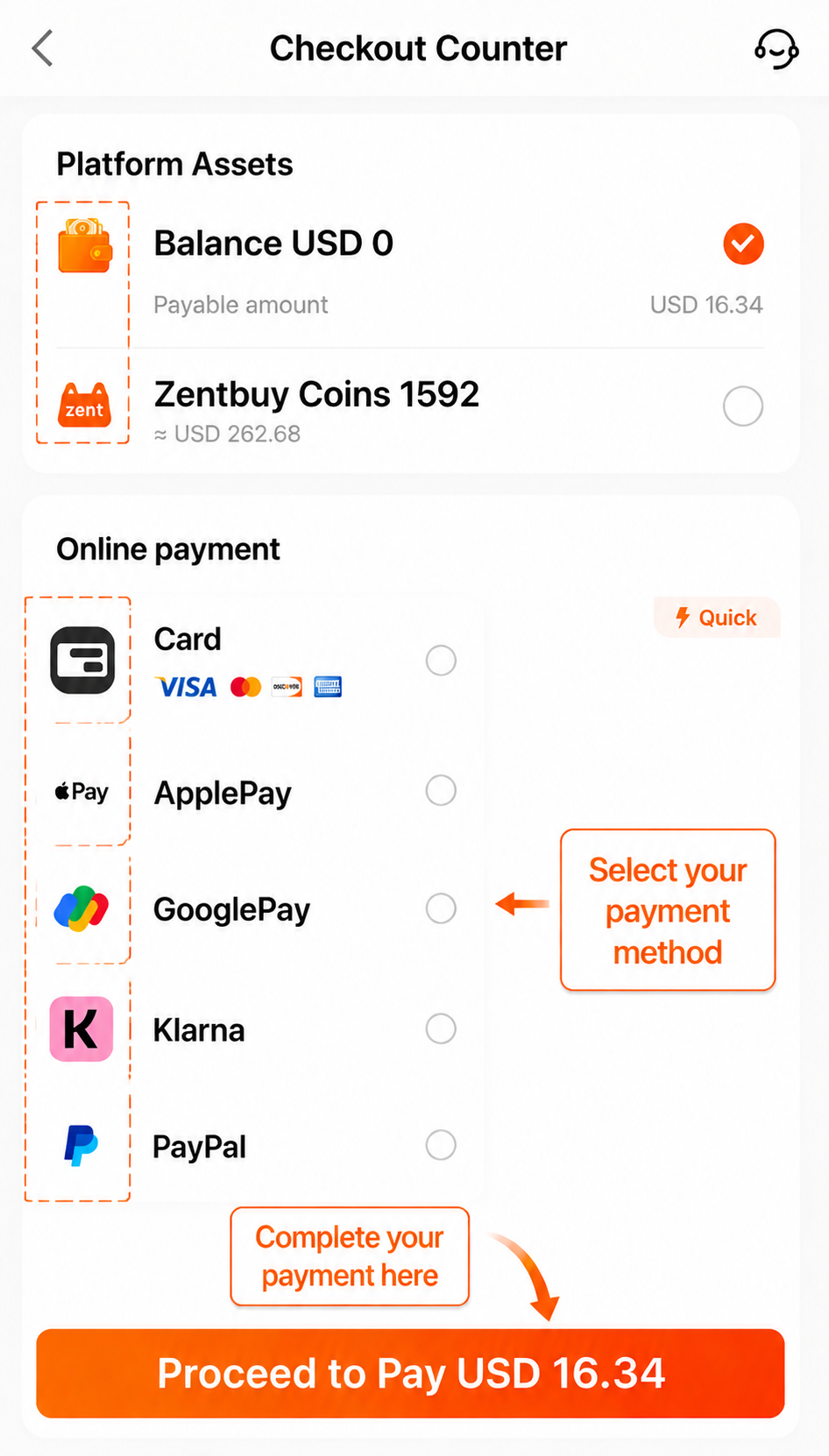
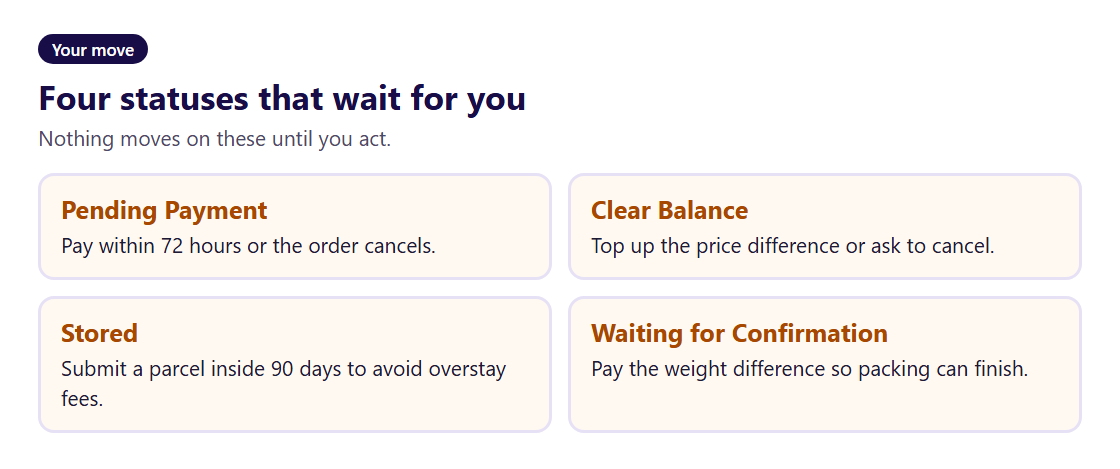
After you confirm, the order sits as Pending Payment for up to 72 hours. Pay from the wallet or by card or PayPal at checkout. Once paid, ZentBuy's current how-to guide says its team reviews and processes the order within 24 hours; follow My Orders for the actual progress. If the seller has raised the price or postage in the meantime, the order drops into Clear Balance until you top up the difference.
Fourth skill: shelving, weighing and the photo set
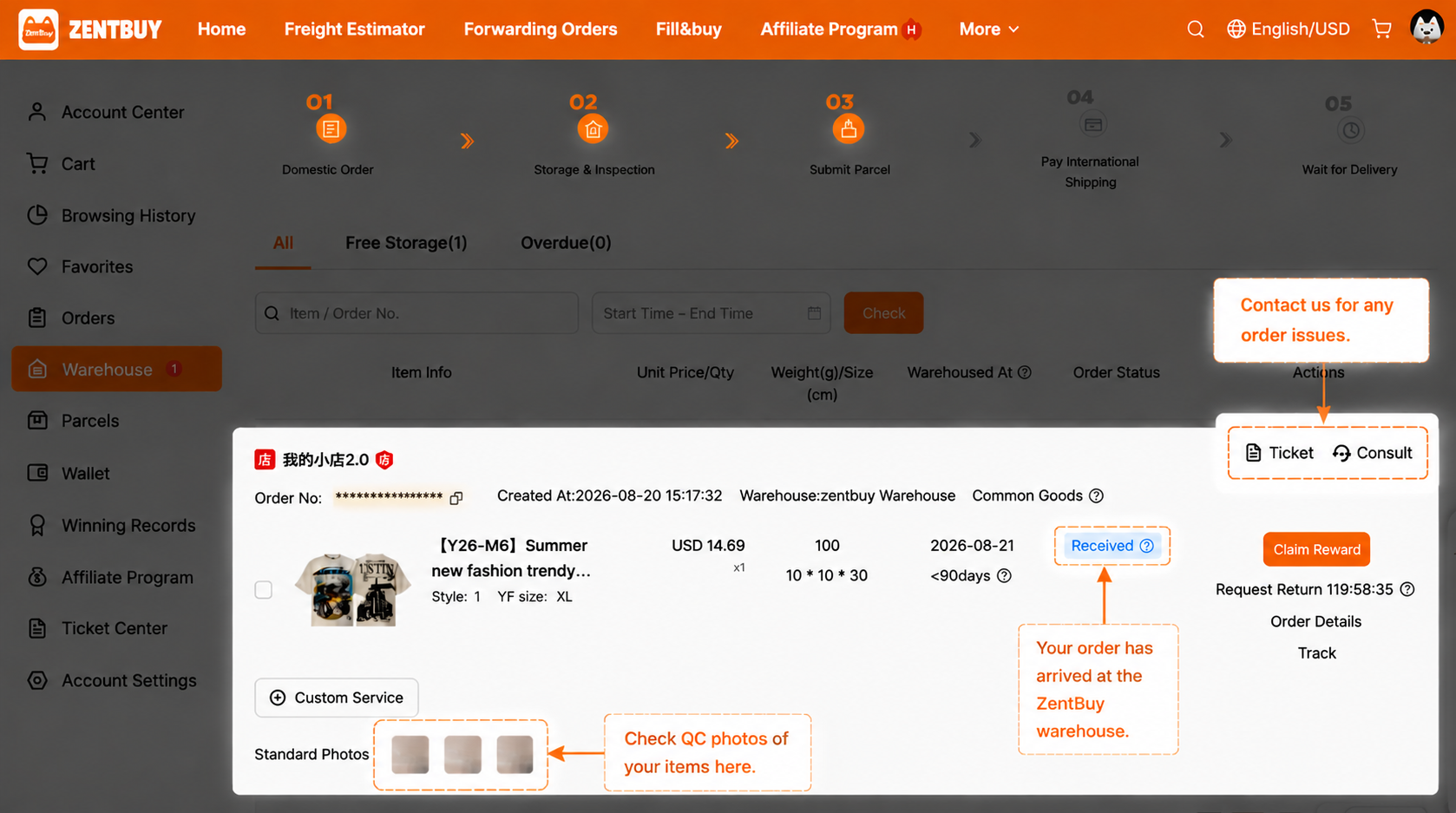
The seller posts to the ZentBuy warehouse, which the order status shows as Shipped (Local); the order status page puts that leg at three to five days. Parcels land first at a delivery point and are scanned into the warehouse within about 48 hours. Staff then open every package to look for prohibited goods, weigh it, compare quantity, colour, size and specification with your order, swap the courier box for a ZentBuy self-sealing bag and shelve it. ZentBuy says this takes up to 24 hours after scanning.
The result is a stored item with a number starting with K, a recorded weight and the routine photo set: generally three to six pictures: one face-on, one from behind and one of a side or the label. Read them before you do anything else, because the five-day return window has already started. The warehouse checks page covers what to look for.
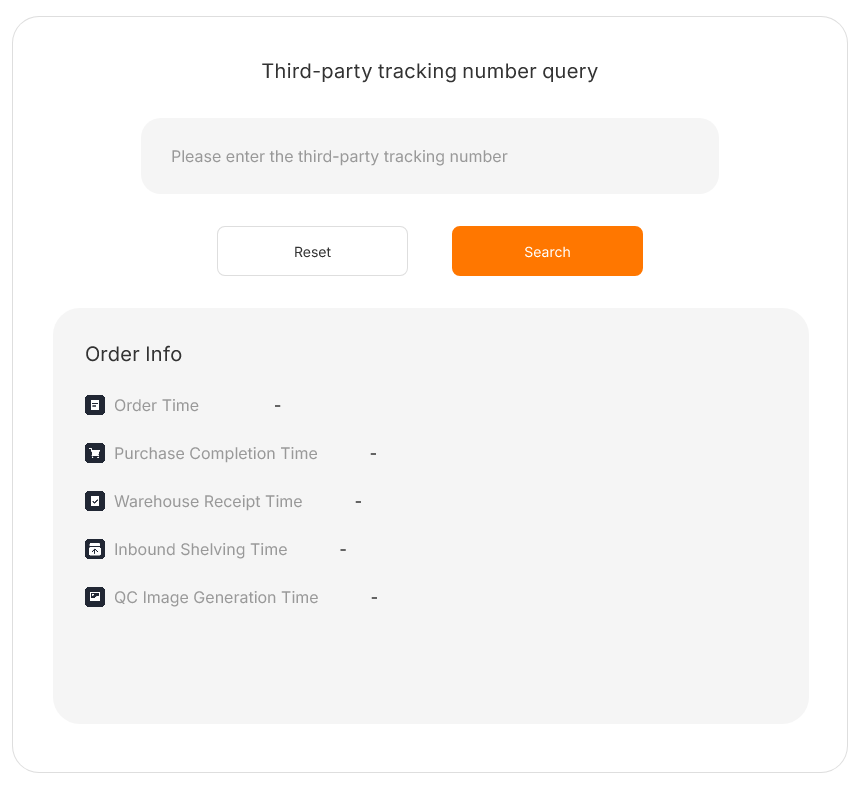
If you want to follow an order without signing in, ZentBuy's SourceTrack page takes a third-party tracking number and shows order time, purchase completion, warehouse receipt, shelving and the time the QC images were generated.
Fifth skill: building the parcel
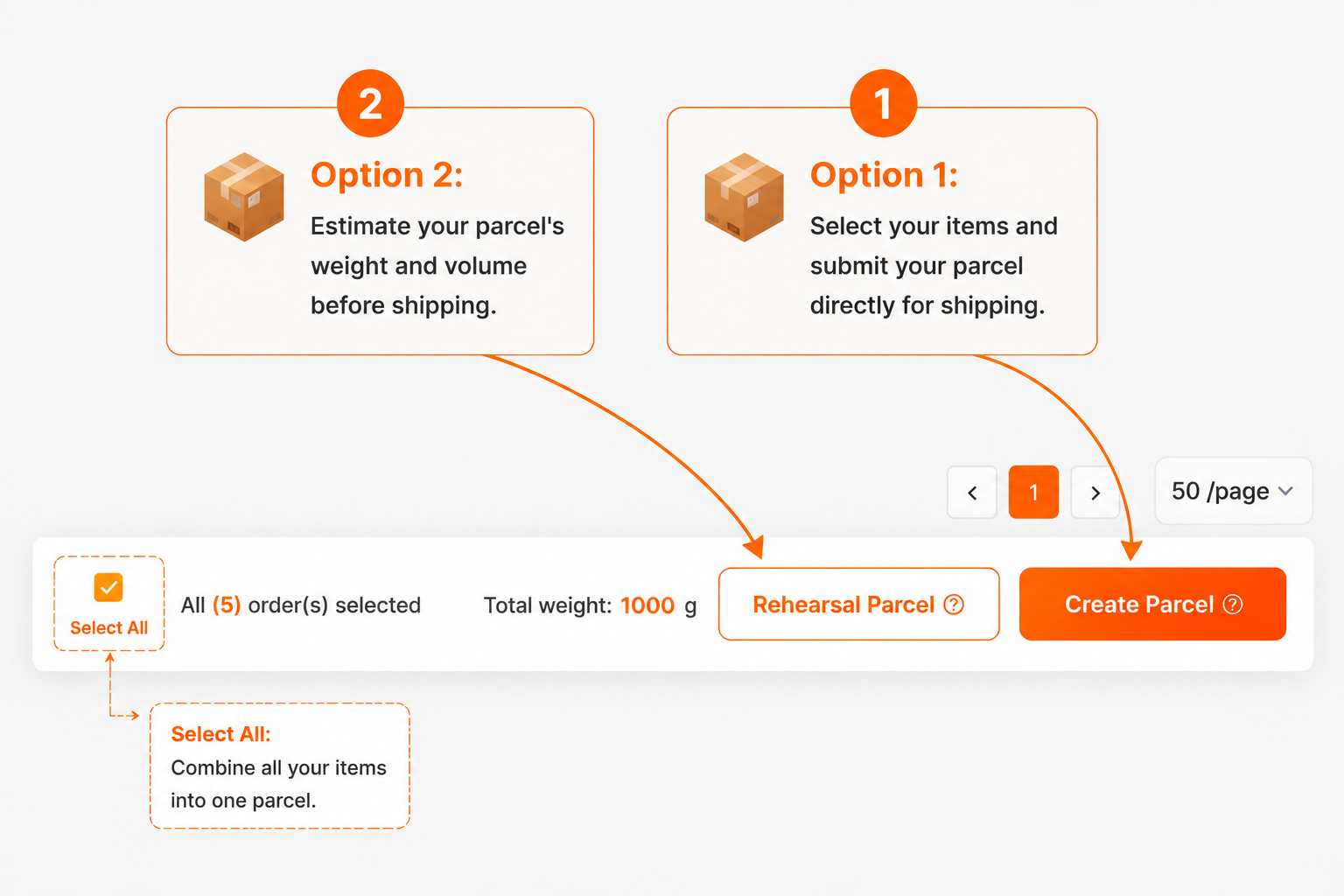
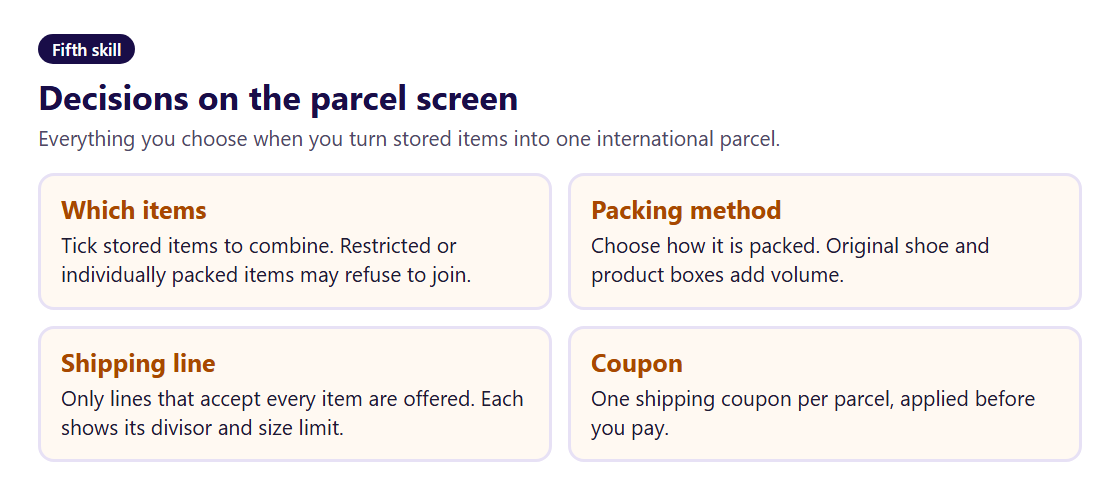
Stored items wait on the Warehouse page until you combine them. Tick the items, confirm where the parcel is going, then pick how it is packed and which line carries it. Only lines that accept every item appear; a restricted item or one marked "individually packaged" can stop others joining it. One shipping coupon can be applied per parcel, on the same screen.
Two habits pay off here. First, decide about boxes: shoe boxes and rigid gift boxes add volume, and every route in our reading prices by volume when volume is larger. Second, keep an eye on size and quantity. ZentBuy's own warning: past ten kilos, or with a stack of one identical item, a parcel starts to look commercial to customs.
Not sure how heavy it will be? The rehearsal parcel option (20 CNY) packs your selection and reports the result, usually within 24 hours, before you pay freight.
Sixth skill: paying freight and the weight settle-up
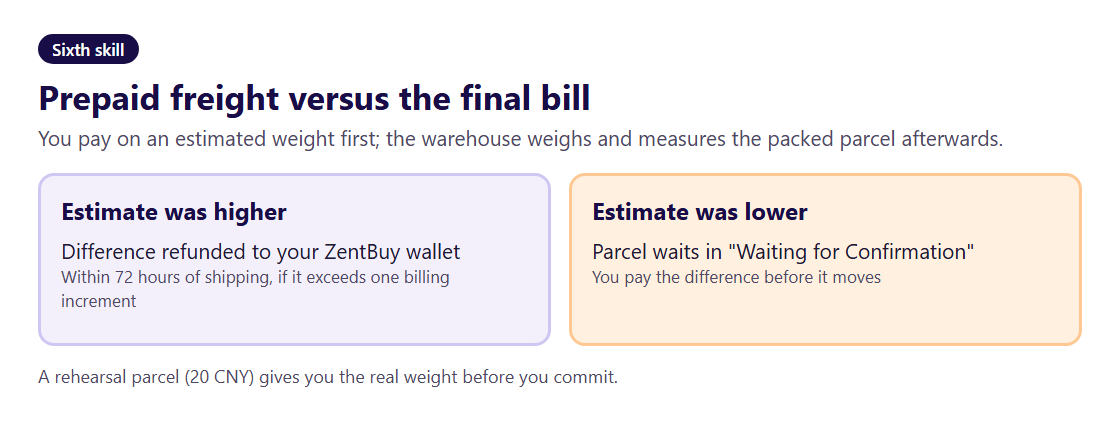
The freight you pay when you submit is a prepayment calculated on an estimated weight, built from the inbound weights of each item. When packing is done the warehouse weighs and tapes the box, then redoes the sum with chargeable weight, meaning whichever is greater of the scale reading and the volume figure.
If the estimate was too high by more than one billing step, the difference goes back to your ZentBuy wallet within 72 hours of shipping. If it was too low, the parcel stops at Waiting for Confirmation until you pay the gap. Routes on the ZentBuy estimator show whether they weigh by volume or by actual weight; in our reading of 520 quotes every one weighed by volume.
Want a rough number before you start? Our route board holds real estimator prices for twelve countries at four weights, dated 23 October 2026.
Seventh skill: the doorstep and after
Once the carrier has it, the parcel shows Shipped (International) and tracking appears on the Parcel page. Some routes post nothing for about three days after shipping, and later scans can be three to ten days apart. ZentBuy's shipping policy notice puts transit, counted from the day a parcel ships, at 7 to 12 business days for Britain, 7 to 14 for EU addresses, 8 to 16 for American ones and 10 to 25 for the rest of the world.
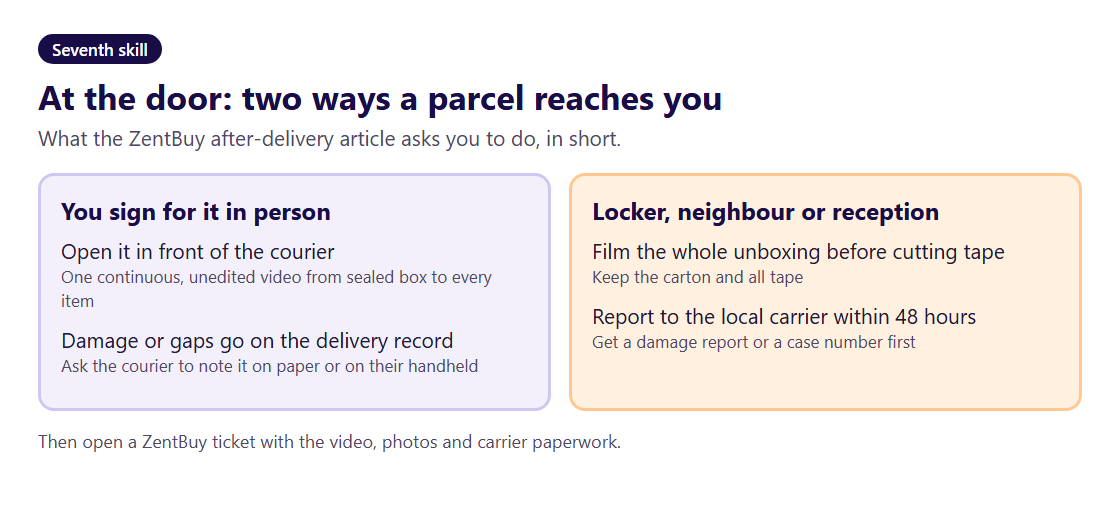
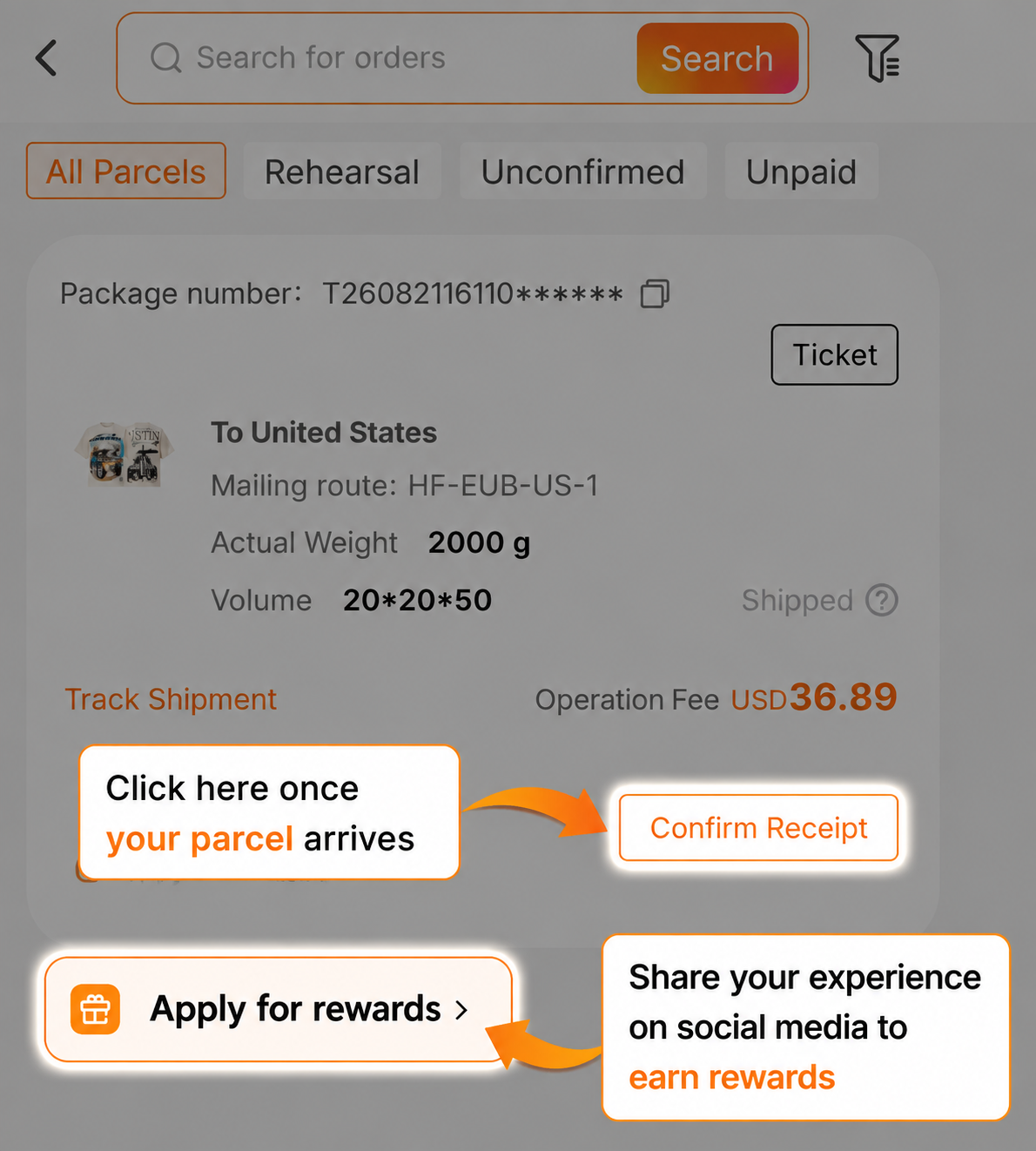
At the door, ZentBuy asks you to accept the parcel rather than refuse it, and to record a single uncut video that starts on the unopened carton and ends with every item out. If you are not there to sign (locker, neighbour, reception), film before cutting any tape and contact the local carrier within 48 hours of the Delivered scan for a damage report or case number. Keep the carton and the tape until any claim is closed. Then press Confirm Receipt; pressing it early by mistake does not affect delivery.
When the route breaks
Most stalls show up as a status that will not move. The status words page explains each one. The common breaks and where they are handled:
- Nothing arrives at the warehouse. If no receipt appears within a reasonable domestic window (ZentBuy says usually three to five days), contact the buyer through the order page; they chase the seller.
- The item is wrong or damaged in the photos. Raise it inside the five-day window from Warehoused. Seller mistakes are normally not charged to you. See returns and parcel trouble.
- No shipping lines appear. An item carries a restriction no route accepts. Check the reason on the Warehouse page or ask support to review it.
- The account is locked. Usually a payment review or a chargeback opened with PayPal or a card company. Everything pauses until it is resolved.
- Tracking goes quiet. Normal for days at a time on some lines; customs clearance is the longest leg.
ZentBuy's own help centre is at zentbuy.com/help; support tickets and the AI Support chat are reached from the site footer once signed in.
Forwarding a parcel you bought elsewhere
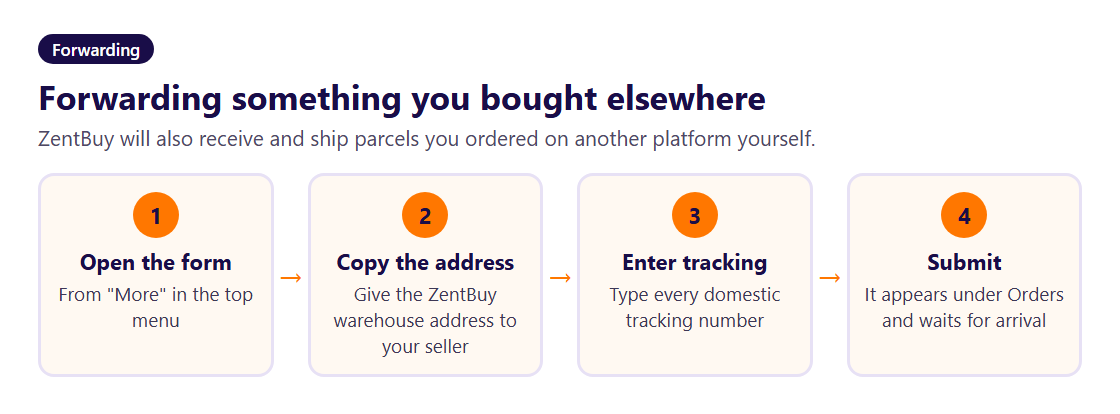
ZentBuy also forwards. If you bought something on a Chinese platform yourself, or a friend in China wants to send you a package, open the forwarding form from the More menu, copy the ZentBuy warehouse address it shows, give that address to the sender and enter every domestic tracking number. The forwarding order then appears under Orders and is handled like any other arrival: inspected, shelved and stored with the same 90 free days.
Accurate tracking numbers matter more than anything else here. A package the warehouse cannot link to any order counts as abnormal: it is kept for 30 days with no reminders and destroyed if nobody claims it.